

Mechanical keyboards have moved from niche hobby to mainstream desk upgrade. Here is how they differ from ordinary keyboards, what the options mean and whether one is worth it for your everyday typing.
How Mechanical Keyboards Differ
Most standard keyboards use membrane designs, where pressing a key pushes a rubber dome onto a circuit layer. They are inexpensive and quiet but can feel mushy, and they often require pressing keys all the way down.
Mechanical keyboards use an individual switch under every key. Each switch contains a spring and moving parts that register a keystroke, providing a more consistent feel and often a distinct tactile or audible response.
This design offers several practical benefits. Keystrokes feel more precise, keys can register before they reach the bottom, and the switches are typically rated for many millions of presses, making the keyboards very durable.
Mechanical keyboards also allow customization. Many models let you swap keycaps, change switches and adjust lighting, giving enthusiasts a way to tailor the look, feel and sound of their keyboard.
The trade-offs include higher prices, more weight and often more noise. Whether those trade-offs are worthwhile depends on how much you type and how much you value comfort and feel.
Understanding Switch Types
Switches are commonly grouped into three categories: linear, tactile and clicky. Each offers a different feel, and personal preference plays the biggest role in choosing between them.
Linear switches move smoothly from top to bottom without a bump. They are popular with gamers for their consistent feel and are often among the quieter mechanical options, though bottoming out still produces some sound.
Tactile switches include a noticeable bump partway through the keypress. This bump signals that the key has registered, which many typists find satisfying and helpful for reducing unnecessary force.
Clicky switches combine a tactile bump with an audible click. They provide strong feedback that some people love, but the noise can be distracting in shared offices, open workspaces or homes with light sleepers.
Switches also differ in actuation force, which is how hard you need to press. Lighter switches can reduce finger fatigue during long typing sessions, while heavier switches may reduce accidental keypresses.
If possible, try a switch tester or a keyboard in a store before buying. Small kits containing several switch types let you feel the differences, helping you choose without committing to a full keyboard.
Sound is part of the experience as well. Some people enjoy the deeper, rounded sound of a well-built mechanical keyboard, while others prefer near silence, so watching or listening to typing tests online can help you decide what you would enjoy hearing every day.
Layouts and Sizes
Full-size keyboards include a number pad, function row and navigation keys. They are ideal for people who enter numbers frequently, such as accountants or anyone working heavily with spreadsheets.
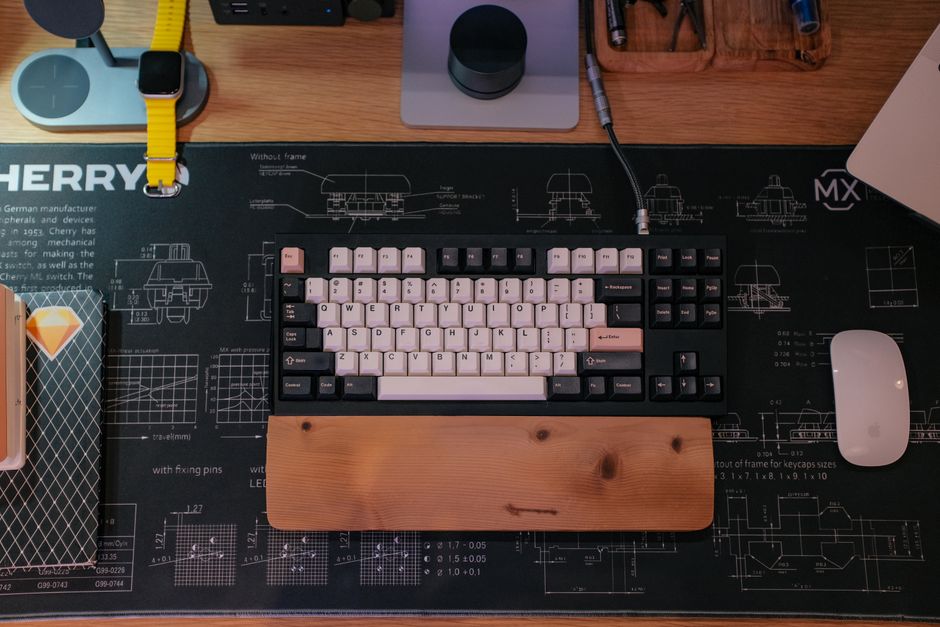
Tenkeyless keyboards remove the number pad while keeping the rest of the layout. This saves desk space and allows your mouse to sit closer to your body, which can improve shoulder comfort.
Compact layouts, such as 75 percent and 65 percent designs, remove or condense additional keys. They keep arrow keys while saving even more space, making them popular for small desks and portable setups.
Very small layouts, such as 60 percent keyboards, remove arrow keys and the function row, relying on key combinations instead. They are space-efficient but may have a learning curve for everyday office work.
Ergonomic layouts, including split and tented designs, aim to reduce strain on wrists and shoulders. They can take time to adjust to but may benefit people who type for many hours each day.
Features Worth Considering
Hot-swappable keyboards let you change switches without soldering. This feature makes it easy to experiment with different switch types or replace a faulty switch without buying a new keyboard.
Wireless mechanical keyboards offer a cleaner desk. Many support both Bluetooth and a low-latency wireless receiver, along with a wired connection for charging or gaming.
Battery life varies widely depending on lighting and connection type. Keyboards with bright backlighting may need frequent charging, while models with lighting turned off can last for weeks.
Keycap material affects feel and durability. Many enthusiasts prefer PBT keycaps, which resist shine and wear better than the more common ABS plastic over years of heavy use.
Sound dampening foam inside the case can make keyboards quieter and more pleasant to type on. Many modern mechanical keyboards include foam layers to reduce hollow or echoing sounds.
Software and compatibility matter as well. Check whether the keyboard supports your operating system and whether its software allows remapping keys, creating shortcuts and adjusting lighting easily.
Are They Worth It for You?
For people who type for several hours a day, a mechanical keyboard can make work more comfortable and enjoyable. A responsive, consistent keyboard reduces frustration and may help you type more accurately.
Gamers often appreciate the precise, consistent actuation of mechanical switches. Features such as anti-ghosting allow multiple keys to be pressed simultaneously without missed inputs.
Casual users who mainly browse and send occasional messages may not notice enough difference to justify the cost. A comfortable membrane or low-profile keyboard may be perfectly adequate.
Budget mechanical keyboards have become surprisingly good. You no longer need to spend a large amount to try mechanical switches, making it easier to discover whether you enjoy them.
Ultimately, a keyboard is a tool you touch thousands of times each day. If a mechanical keyboard makes that experience more comfortable and enjoyable, it can be one of the most satisfying upgrades for your workspace.