

Paying with a phone or watch is fast and convenient, but many people wonder whether it is safe. Here is how digital wallets protect your payment information and how they compare with physical cards.
How Digital Wallets Work
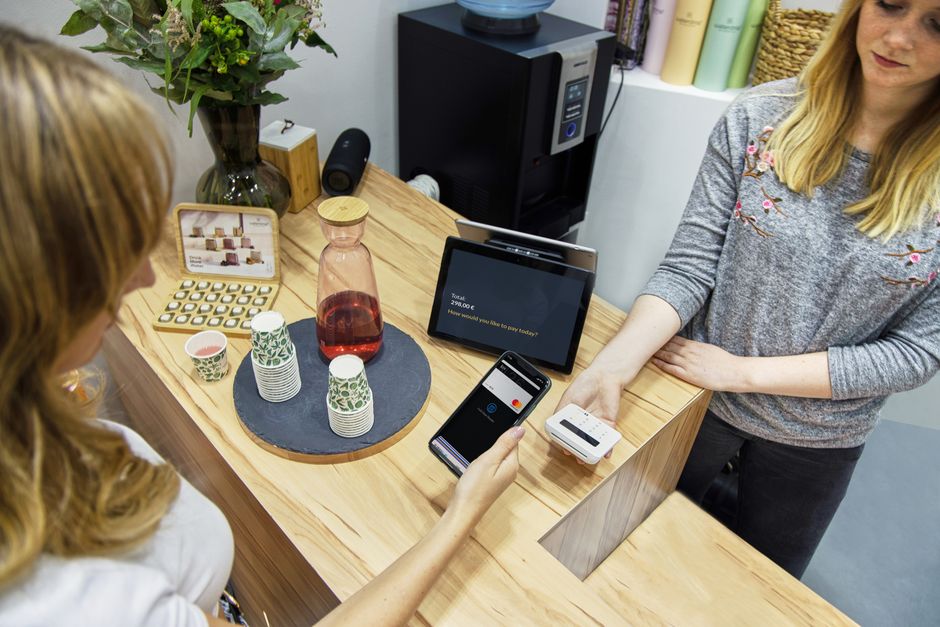
Digital wallets store your payment cards on a phone, smartwatch or other device so you can pay without pulling out a physical card. At checkout, you hold the device near a contactless terminal, confirm the payment and the transaction is complete within seconds. Setup usually takes only a few minutes in the wallet app.
Tap to pay relies on near-field communication, a short-range wireless technology that works only when devices are within a few centimeters of each other. That short range makes it difficult for anyone to intercept the exchange from a distance. It also means payments happen only when you deliberately bring your device close to the reader.
The most important security feature is tokenization. When you add a card, the wallet receives a unique substitute number, called a token, and that token is what merchants receive instead of your real card number. Each payment also includes a one-time code that is useless if copied.
Because merchants never see your actual card number, a data breach at a store exposes far less useful information. Stolen tokens generally cannot be used for purchases elsewhere. This limits the damage when retailers are hacked, which happens more often than most shoppers realize.
Digital wallets work for online and in-app purchases too. Instead of typing card details into a website, you confirm the purchase with your fingerprint or face. That speeds up checkout and keeps your card number off yet another company’s servers.
Security Features That Protect You
Every wallet payment requires authentication on your device, usually with a fingerprint, face scan or passcode. Someone who finds your phone cannot simply tap it on a terminal. A lost contactless card, by contrast, can often be used for smaller purchases without any verification at all.
If your phone is lost or stolen, you can lock or erase it remotely using its find my phone feature. You can also ask your bank to suspend the card tokens stored on that device without canceling your physical card. That means you can keep using your plastic card while the problem is resolved.
Wallet payments help defeat card skimmers. Skimming devices hidden in gas pumps and ATMs capture information from magnetic stripes, and tapping your phone never exposes that data. This is one of the biggest practical advantages of digital wallets for everyday purchases.
Most wallets and banking apps send instant notifications for each transaction. These alerts help you spot unauthorized charges quickly, often within minutes. The sooner you see a suspicious charge, the better your chance of stopping fraud before it grows.
Wallet transactions are still backed by the protections of the underlying card. Credit cards in particular limit your liability for unauthorized charges. Using a credit card inside a digital wallet combines strong technical security with strong legal protection.
Comparing Wallets and Physical Cards
A physical card displays its number, expiration date and security code to anyone who sees it. A photo of the card or a quick glance by a dishonest cashier can be enough for someone to use it online. A digital wallet keeps all of these details hidden from view.
Chip cards are also quite secure for in-person payments, because each transaction generates a unique code. However, chip cards still reveal the card number to the merchant, while tokenized wallet payments do not. That difference matters most when the systems of a merchant are breached.
Contactless physical cards offer tap convenience without needing a phone. They use similar one-time codes to chip cards, but they typically lack the fingerprint or face verification that wallets require. That makes a lost contactless card easier to misuse than a lost phone.
Physical cards have one clear advantage: they never run out of battery. A dead phone means your wallet is unavailable at the worst possible moment. Carrying at least one physical card as a backup remains a smart habit.
For most everyday purchases, a digital wallet offers equal or better security than a physical card. The strongest approach is to use the wallet when possible and keep a physical card tucked away for places that do not accept mobile payments. That combination gives you both protection and reliability.
Potential Risks to Consider
Your wallet is only as secure as your phone. A short or easily guessed passcode undermines the protection that biometrics provide, so use a strong code and never share it. Anyone who can unlock your phone may be able to approve payments.
Scammers sometimes try to add your card to their own wallet. They may call or text pretending to be your bank and ask you to read back a verification code, which actually authorizes your card on their device. Never share these codes with anyone who contacts you, no matter how official they sound.
Not every merchant accepts mobile payments, particularly some small businesses, older terminals and certain transit systems. Before relying entirely on your phone for a trip, confirm that the places you plan to visit accept contactless payments. A little planning prevents an awkward moment at the register.
Privacy policies differ between wallet providers. Some collect limited data about purchases, while others may use transaction information for other services. Review the privacy settings and terms of the wallet you use and turn off any data sharing you are not comfortable with.
Technical issues can occasionally block payments, such as software glitches or poor terminal connections. These problems are rare but frustrating when they happen. They are another reason to keep a backup payment method with you.
Using Digital Wallets Safely
Secure your device with a strong passcode and biometric unlock, and enable automatic screen locking. These basic steps protect your wallet along with everything else stored on your phone. They take only a minute to configure and remain among the most effective protections available.
Keep the operating system and wallet app on your phone updated. Security updates close vulnerabilities that criminals could exploit. Turning on automatic updates keeps your payment information protected without you having to remember.
Turn on transaction alerts from your bank and card issuer. Instant notifications let you catch suspicious activity immediately and report it before additional charges appear. Reviewing your full statements each month adds a second layer of protection.
Add credit cards to your wallet rather than debit cards when possible. Credit cards offer stronger protection against fraud. Disputed charges also do not drain money from your checking account while they are investigated.
Used carefully, digital wallets are one of the safest and most convenient ways to pay. Combining tokenization, biometrics and good device security gives you strong protection every time you tap. For most people, switching to a wallet for everyday purchases is a simple security upgrade.